
Formative
Formative: help and support
Formatives are managed by teachers, who make any changes to them.
Note: your Formative login is the same as your Microsoft 365 login, and the password syncs too.
Contact IT if: you forgot your password or your account is locked. Only IT can reset school passwords, so submit a ticket.
Students: if something is wrong with an assignment or a grade, ask your teacher. Teachers manage Formative assignments.
Formative: https://app.formative.com/home
Getting support
Look for the Support links in the lower-left corner of the screen, as in the picture below. You can start a chat with Formative support for a faster response.
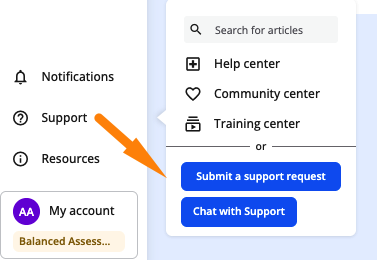 Opening a ticket with Formative
https://www.formative.com/support
Teachers can open tickets directly with Formative for these problems. Include screenshots to help them troubleshoot.
• Grade passback errors
• Errors that are specific to Formative
Opening a ticket with Formative
https://www.formative.com/support
Teachers can open tickets directly with Formative for these problems. Include screenshots to help them troubleshoot.
• Grade passback errors
• Errors that are specific to Formative
Opening a ticket with Formative
https://www.formative.com/support
Teachers can open tickets directly with Formative for these problems. Include screenshots to help them troubleshoot.
• Grade passback errors
• Errors that are specific to FormativeUpdated Oct 7, 2026 1:11 PM